
Licence and updates
Monitor the domain licence, update entitlement and package integrity on a separate screen.
Licence and service scope
You get a lifetime usage licence for one domain and free updates for the first 6 calendar months. After that, you can buy a 6-month (1,490 TL + VAT) or 12-month (2,490 TL + VAT) Support and Update Pack; if the period has already ended, the pack starts from the payment date. The end of the update entitlement does not end your right to use the installed, licensed version.
Downloading a new Marketplace package requires both a valid domain licence and an active update entitlement. New packages are not issued to accounts without a licence, with a cancelled licence or with an expired update period. After renewal, the download entitlement is reassessed. Because the WISECP Marketplace can cache a positive check for ten minutes, an expiry may take a while to show on the Marketplace.
The first installation and the first domain change are free; any further installation costs 500 TL + VAT and an additional domain change 250 TL + VAT. Confirm current prices and scope in your Hostimor account.
Installation key and domain
On the My Hostimor licences screen, verify the relevant service and the licensed domain. Save the installation key on the add-on’s Licence page. For a domain change, request support through the existing service; copying the key to another domain does not give you a new licence.
1.1.0: no installation key is used; the licence is verified against the domain of your WISECP licence. Domain changes are made from the service in your hostimor.com client area (the first change is free).
Updating through the Marketplace
1.1.0 was released on 24 October 2026. The approved encrypted installation package and updates are provided through the WISECP Marketplace. Licences are on sale through Hostimor; downloads need an active domain licence and update entitlement.
In the Marketplace edition, every new package goes through a separate WISECP review. WISECP’s native update wizard is used for update notifications and installation. The add-on’s direct Hostimor update installer is disabled in this package; no separate update address is entered.
- In your Hostimor account, verify that your domain licence and update entitlement are active.
- Take a backup of files and database.
- Open WISECP’s add-on update notification; review the version and complete the native update wizard.
- Check the installed version, the licence, integrity and a test chat.
The native update wizard keeps the existing config.php settings. Re-uploading the package manually may overwrite the settings file at the same path; a manual update requires a settings backup and a restore plan. The add-on’s upgrade process keeps existing conversations.
Updating from 1.0.15 to 1.1.0
1.1.0 was released on 24 October 2026. The update is offered through WISECP’s add-on update notification; the administrator starts the installation.
- Take a backup. Back up the files, database and add-on settings.
- Install the update. Open WISECP’s add-on update notification and complete the native update wizard. Settings, conversations and attachments are kept.
- Open the Licence page. The installation key field is gone; the licence is verified automatically against the domain of your WISECP licence. On the licence card, the status should show Active and package integrity Verified; if needed, press Re-check.
- Check the Branding Customization entitlement. As on 1.0.15, the entitlement comes with the signed licence response; if you have an active add-on, the footer options on the Appearance page stay unlocked.
- Open a test chat. Start a chat as a visitor and reply as an operator.
The add-on’s own update channel and the installation key have been removed; updates come only from the WISECP Marketplace. When WISECP finds a new version, the licence card opens WISECP’s own update wizard.
Integrity and temporary connection errors
Integrity information comes from the signed list inside the package. A full scan runs on installation and on the administrator check. If there is no record, the package digest has changed or the installation has been moved to another directory, the first request scans automatically. Normal pages use the verified local cache; after an update you do not have to wait for the administrator button. In the Marketplace package, the 39 files that WISECP encryption leaves unchanged are checked. Encrypted PHP files and changeable installation settings are excluded from the file digest; the product ID and version in the platform manifest written by WISECP are verified separately.
Malformed JSON, a Cloudflare page, an HTTP error or an unsigned response does not delete a saved valid licence. Only a valid, verified signed refusal can invalidate the usage licence. A temporary access problem is not interpreted as being unlicensed; the add-on’s defined offline tolerance applies. A remote server or integrity problem does not throw an error that would take down the admin area.
14 October 2026 fix: while WISECP copies files one by one, a temporary failed integrity result can occur. This result is cached for at most 60 seconds; once that time has passed, the next visitor check or the per-minute task scans again. If files are genuinely corrupted, the chat does not open until they pass verification. Normal requests on verified packages do not repeat the full scan.
Existing direct installations
Older versions installed directly from Hostimor and the Marketplace distribution are separate channels. Publication on the Marketplace does not change an existing installation automatically. To move to the Marketplace channel, take a backup of files/database and settings, and use the approved package for your licence. Moving from the source package to the encrypted package of the same version may not trigger a newer-version notification.
12-month branding customisation entitlement
2,499 TL + VAT / 12 months. The add-on service is tied to the main live chat licence of the same account. The entitlement comes from the server in the signed licence response; writing text/URLs into the local settings does not provide it on its own.
With an active entitlement, the footer can be hidden, or custom text and a full HTTPS address can be used. If the add-on has not been purchased, has been cancelled or has expired, the Hostimor attribution is shown. The end date is checked on your server every time the chat is displayed; a valid licence cache does not extend the term. After renewal, verify the licence again on the Licence page (1.0.15: Verify licence, 1.1.0: Re-check) and the entitlement is refreshed; saved preferences can be used again.
The 12-month branding entitlement is separate from the free main update entitlement of the first 6 months and from later update packs. The lifetime main licence is not affected when this add-on ends. Only the footer of the chat window is covered; the WISECP attribution and source copyright notices are kept. Publication on the Marketplace is complete; new licences are on sale through Hostimor.
Licence and integrity screen
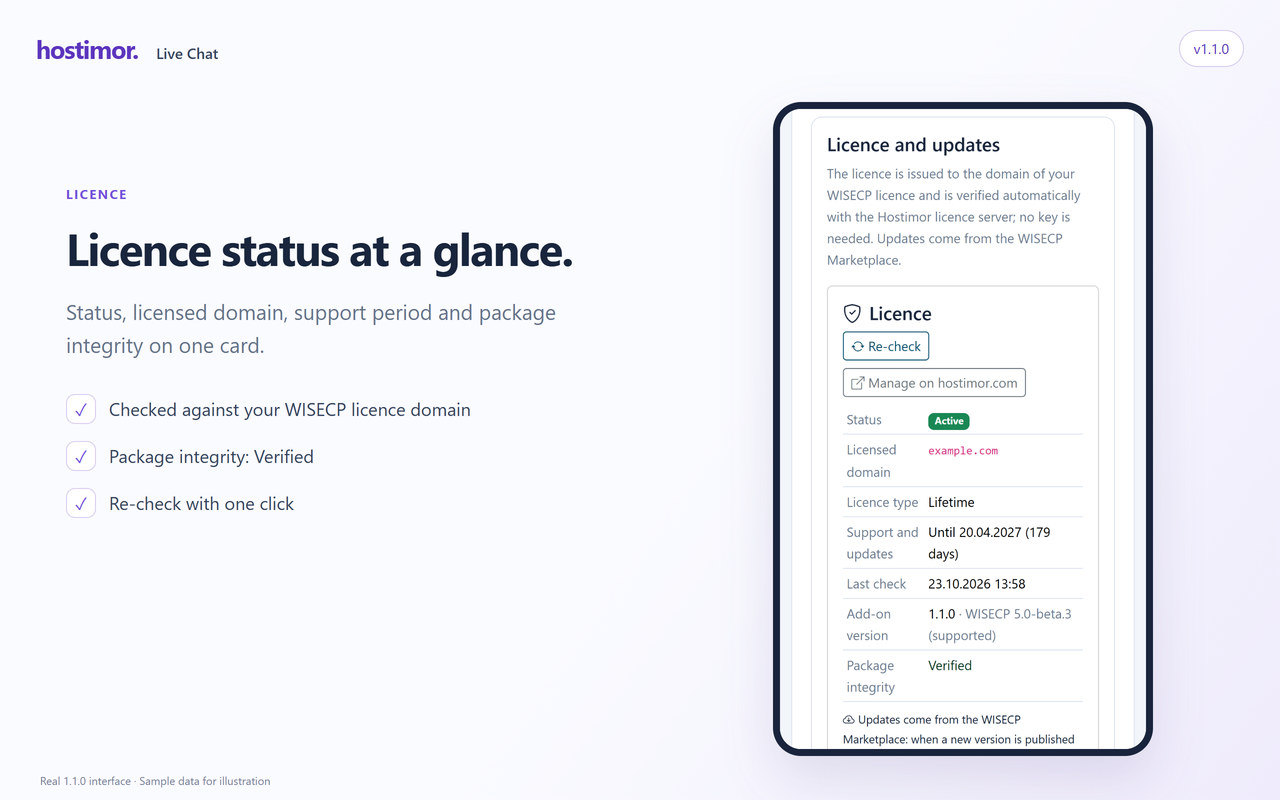
Check the installed version and the domain licence on this page. On 1.1.0 package integrity is shown on the licence card and checked again with Re-check (on 1.0.15 this was the Check integrity button). After an update, a missing or outdated integrity record is refreshed automatically on the first request.
The image shows the 1.1.0 licence card; verify your installed version in your own panel.
Updating without losing settings
The Marketplace package does not use a separate Hostimor update address; every new version goes through WISECP review. Submitting a version for review does not update installed add-ons. After approval, use WISECP’s add-on update wizard.
Before updating, take a backup of files/database and settings. The native wizard keeps the existing settings and refreshes the version label. Re-uploading the initial installation ZIP manually may overwrite the config.php file at the same path. Old files that are no longer in the package may not be deleted automatically on every upload path; for files that need removing, follow the published steps for the release.
Live verification on 14 October 2026
On Hostimor.com, with a single test conversation open, copying the same 1.0.14 source package file by file was tested under controlled conditions. The failed record created while the signed list was already new and a view file was still old returned automatically to verified status, with the package digest unchanged. The administrator verification button was not used; the chat history and draft were kept, and then a new message and an automatic reply were verified.
This test verifies the copy race and the recovery of an open chat; it is not an acceptance test of the update wizard with the Marketplace package encrypted and approved by WISECP. Hostimor’s installation checks of the approved encrypted package are recorded separately below; this older record should not be read as a native update wizard test.
16 October: installing the approved encrypted package
On 16 October 2026, the approved 1.0.14 package was obtained from the Marketplace through Hostimor’s existing WISECP licence and installed. The 7 protected PHP files in the package are encrypted with ionCube. During installation, the existing settings file was kept; the licence and the integrity of the 39 files in the signed list were verified. Existing chat and support records were kept.
This operation is a switch from the source copy to the approved encrypted copy of the same 1.0.14 version. Update wizard testing for later, different versions is assessed separately.
In the final browser check, the admin chat, general settings, appearance, business hours, AI, licence and guide pages were opened. Verification with the licence server and the full 39-file integrity scan passed. With a test visitor, a Claude reply, handover to an operator, the administrator taking over and replying, and the message reaching the customer were verified; no duplicate messages occurred. In the 390-pixel mobile view there was no horizontal overflow; the collapsible summary and the visible message box were checked. The test conversation was completed; new licences are on sale.
18 October: conversation security and the 1.0.15 release
On 18 October 2026, automatic account transfer of guest conversations was removed on the Hostimor.com installation; a conversation confirmed to have been matched incorrectly was separated from customer access, with its messages kept. Ending without taking over, soft deletion and read badges were checked on the live admin screen. The existing 7 ionCube-encrypted files were kept; the licence and the 39-file signed integrity check passed.
The complete 1.0.15 package containing the same changes was approved and published on the WISECP Marketplace on 18 October 2026. Licences are on sale; get the approved package from the Marketplace. In independent browser sessions, refusal of unauthorised reading/sending, the schema 1 → 2 upgrade on PHP 8.2/MySQL and the preservation of messages were verified.