
Manage your theme with ease.
Step-by-step guides for installation, appearance and content management.
Where would you like to start?
Installation and initial setup
Upload the theme, activate it and connect it to your own WISECP records.
Theme editor
Edit every page section by section, in the order the sections appear on the site, with a live preview if you like.
Content management map
Quickly find where to edit what, and where the content is stored.
Menus and footer
Manage desktop menu, mobile menu and footer links with the same admin records.
Products and package pages
Prices, stock, categories and product features come from WISECP records; the layout of the package and software showcases is chosen in the theme editor.
Client area and branding
Bring the client area your customers see in line with your website colours.
A theme editor with live preview.
Edit pages section by section in the order they appear on the site, and check home page changes as a draft before you publish them. On a new site, “Hostimor yapısını kur” (Set up the Hostimor structure) prepares categories, sample packages, pages and menus in one click. Release notes →
New in 1.3.17 (20 October 2026): 2–5 columns and a horizontally scrolling layout for home page packages, domain extensions with registration prices and a multi-product software showcase. Package and showcase settings →
New in 1.4.0 (24 October 2026): one licence structure shared by all Hostimor products, a new licence card in the theme settings and a new theme folder. Moving to 1.4.0 →
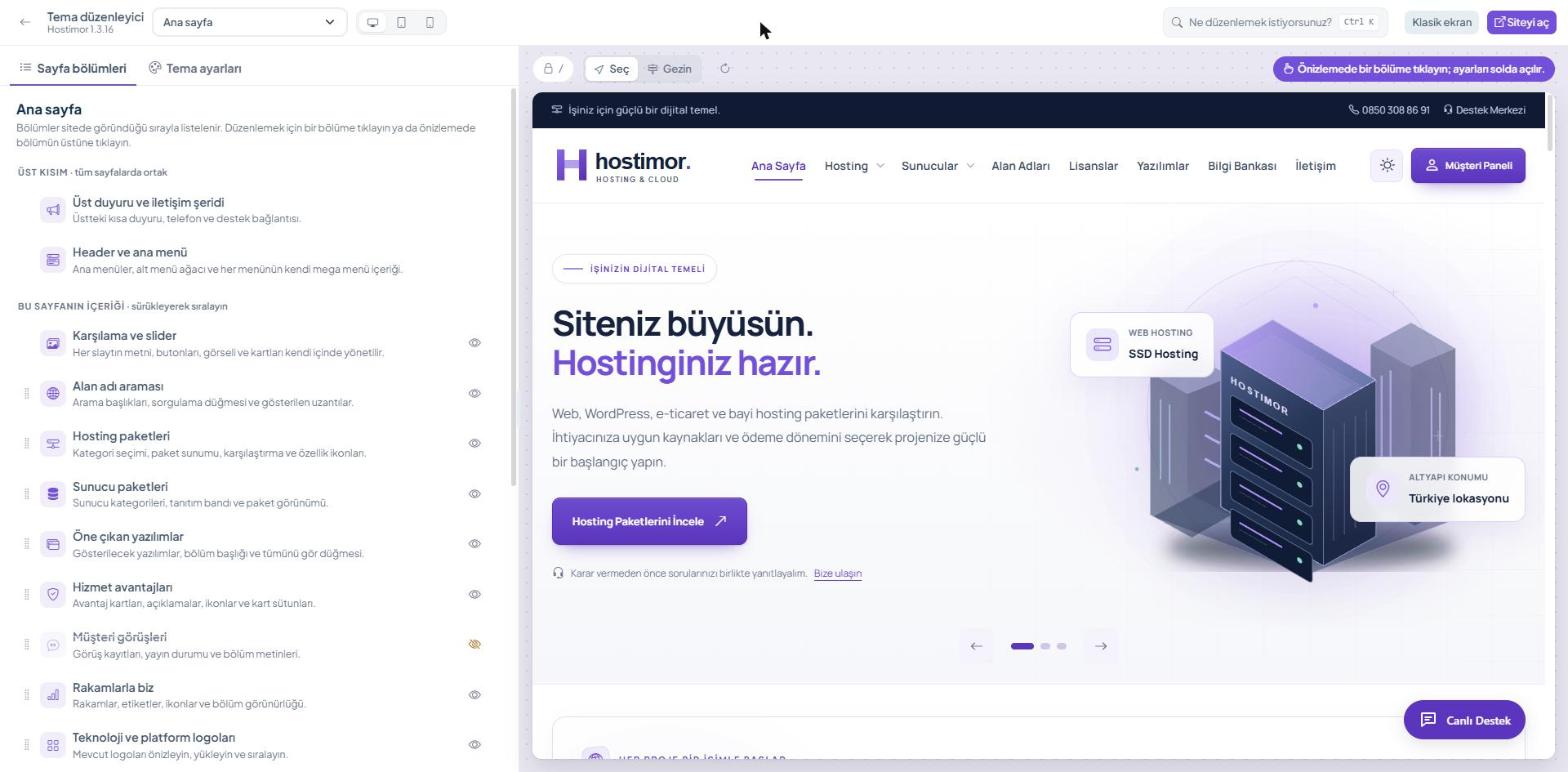
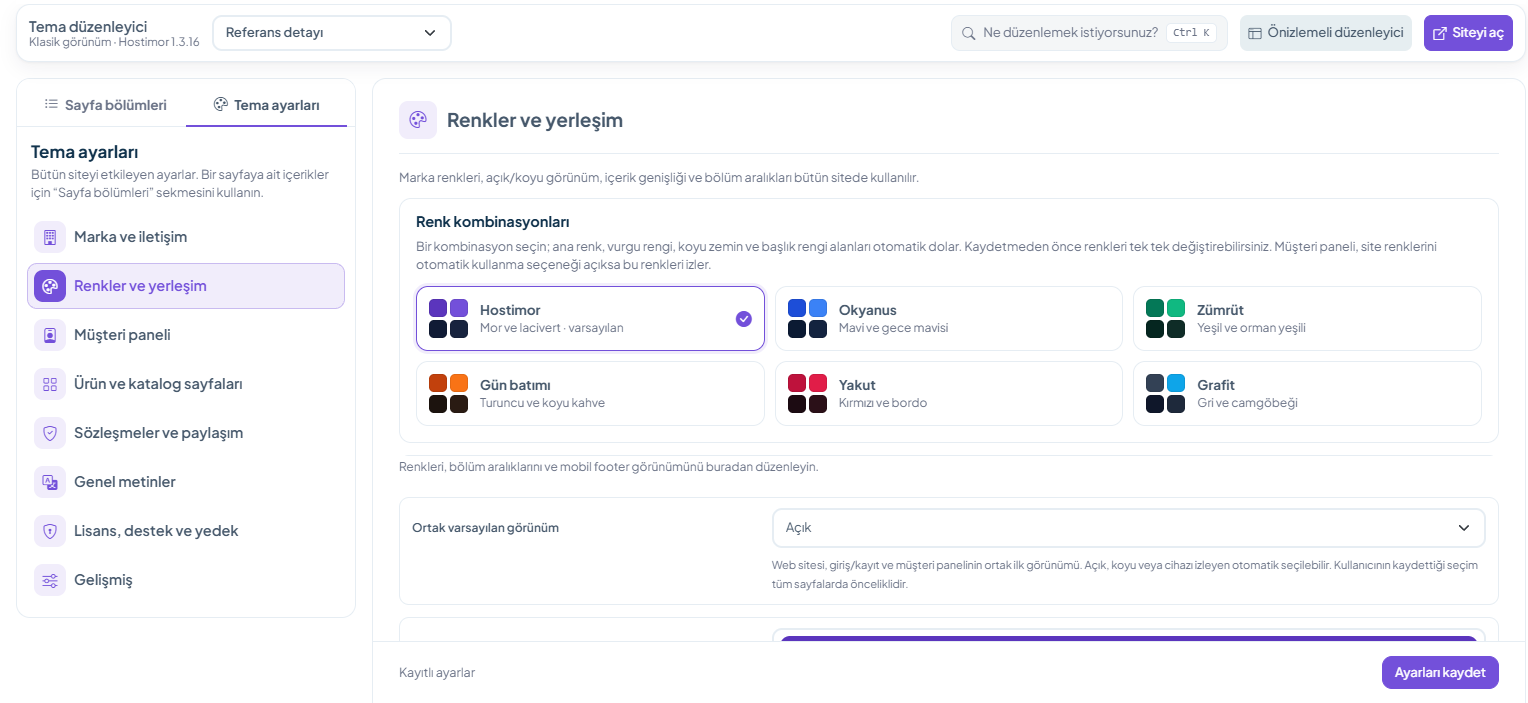
Light, dark and automatic appearance, six ready-made colour combinations, the mega menu and two client area layouts are all managed from the same editor. Appearance guide →
Compatibility and release status
The installation package approved by WISECP on 24 October 2026 is downloaded from the WISECP Marketplace. Sales and support are provided by Hostimor.
New in 1.4.0 (24 October 2026): licensing moves to the Hostimor Licence Centre, shared by all Hostimor products; the theme settings get a new licence card (status, licensed domain, end of support, package integrity, “Re-check”), and the theme is installed in a new folder (templates/website/HostimorTheme). 1.4.0 is a new WISECP Marketplace product: it does not reach 1.3.x installations as an update notification; you install it from the Marketplace as a separate theme, and the 1.3 settings are not carried over. Moving to 1.4.0 →
New in 1.3.17: separate column (2–5) and layout (stacked / horizontally scrolling) settings for the home page hosting and server packages, domain extensions with registration prices, a multi-product software showcase, and light/dark appearance improvements. Release notes →
New in 1.3.16: a theme editor with live preview, section-by-section management of pages from a single list, draft and publish for home page content, one-click site setup (“Hostimor yapısını kur”: set up the Hostimor structure), six ready-made colour combinations, and the Genel metinler (General texts) tool for interface phrases. Licences with an active support and update entitlement receive the update through the WISECP Marketplace.
For 1.4.0, 1.3.17 and 1.3.16, the minimum and tested WISECP version is 5.0-beta.3 (PHP 8.2). The WISECP Marketplace does not offer this package for download to WISECP installations running a version above the highest one the package supports. For 1.3.14, the minimum version is 5.0-beta.2. On newer versions that have not been tested yet, the administrator sees a compatibility warning. Take a backup and check the release notes before updating.
Lifetime use for a single domain. The first 6 months of support and update access are free. After that, you can buy a Support and Update Pack: 6 months 1,490 TL, 12 months 2,490 TL. If you still have active time, the pack is added to the end of the remaining period; if it has expired, it starts from the payment date. The end of support does not end your right to use the installed licensed version.
Quick links
Stay up to date with changes.
The current release, compatibility details and update steps.
Read the release notes →Find the answer you need.
Single-domain licence, the first 6 months of support and renewal options.
Open the support guide →